2024. 6. 16. 15:48ㆍgit, 리눅스
MINGW64 ~/Documents/gitfth/chapter3 (main)
$ git branch
* main
git branch : 현재 있는 브랜치를 보여주는 명령어
MINGW64 ~/Documents/gitfth/chapter3 (main)
$ git branch exp
git branch <브랜치명> : 브랜치 생성 명령어
MINGW64 ~/Documents/gitfth/chapter3 (main)
$ git checkout exp
Switched to branch 'exp'
git checkout <이동하고 싶은 브랜치명> : 입력한 브랜치명으로 이동해주는 명령어
MINGW64 ~/Documents/gitfth/chapter3 (exp)
$ git log --branches --decorate --graph
* commit 8435af1077a929bc1132aacf79480381dcb5e341 (HEAD -> exp)
| Author:
| Date:   Sun Jun 16 14:24:24 2024 +0900
|
|     4
|
* commit 0e9ed2df354e577cbcb30de085ac05bf7a69d242
| Author:
| Date:   Sun Jun 16 14:21:19 2024 +0900
|
|     3
|
* commit f9d13adc373f2763178945da0771a3757308d610 (main)
| Author:
| Date:   Sun Jun 16 14:10:19 2024 +0900
|
|     2
|
* commit b7253659ff8e11ac2d12895ded41e42620e19231
  Author:
  Date:   Sun Jun 16 14:08:18 2024 +0900

      1
git log --branches --decorate : branch들 간의 log 차이를 한번에 보여주는 명령어
현재 main은 커밋메시지 : 2까지 되어 있는 상태
exp branch는 커밋메시지 : 4까지 되어 있는 상태
HEAD는 현재 위치하고 있는 브랜치를 의미
MINGW64 ~/Documents/gitfth/chapter3 (main)
$ git log main..exp
commit 8435af1077a929bc1132aacf79480381dcb5e341 (exp)
Author:
Date:   Sun Jun 16 14:24:24 2024 +0900

    4

commit 0e9ed2df354e577cbcb30de085ac05bf7a69d242
Author:
Date:   Sun Jun 16 14:21:19 2024 +0900

    3
git log <브랜치명A>..<브랜치명B> : A에는 없고 B에는 존재하는 커밋이력을 보여주는 명령어
MINGW64 ~/Documents/gitfth/chapter3 (main)
$ git merge exp
Merge made by the 'recursive' strategy.
 f1.txt | 1 +
 f2.txt | 1 +
 2 files changed, 2 insertions(+)
 create mode 100644 f2.txt

MINGW64 ~/Documents/gitfth/chapter3 (main)
$ git log --branches --decorate --graph --oneline
*   67a05c7 (HEAD -> main) Merge branch 'exp'
|\
| * 8435af1 (exp) 4
| * 0e9ed2d 3
* | 11a0774 5
|/
* f9d13ad 2
* b725365 1

MINGW64 ~/Documents/gitfth/chapter3 (main)
$ ls -al
total 15
drwxr-xr-x 1 dlgyw 197609 0 Jun 16 15:23 ./
drwxr-xr-x 1 dlgyw 197609 0 Jun 16 14:06 ../
drwxr-xr-x 1 dlgyw 197609 0 Jun 16 15:24 .git/
-rw-r--r-- 1 dlgyw 197609 9 Jun 16 15:23 f1.txt
-rw-r--r-- 1 dlgyw 197609 3 Jun 16 15:23 f2.txt
-rw-r--r-- 1 dlgyw 197609 3 Jun 16 15:21 f3.txt
현재 있는 브랜치(main)에서 exp브랜치에 있는 내용을 병합하고 싶다.
git merge exp;
MINGW64 ~/Documents/gitfth/chapter3 (main)
$ git checkout exp
Switched to branch 'exp'

MINGW64 ~/Documents/gitfth/chapter3 (exp)
$ git merge main
Updating 8435af1..67a05c7
Fast-forward
 f3.txt | 1 +
 1 file changed, 1 insertion(+)
 create mode 100644 f3.txt

MINGW64 ~/Documents/gitfth/chapter3 (exp)
$ git log --branches --decorate --graph --oneline
*   67a05c7 (HEAD -> exp, main) Merge branch 'exp'
|\
| * 8435af1 4
| * 0e9ed2d 3
* | 11a0774 5
|/
* f9d13ad 2
* b725365 1
exp브랜치에서 main에 있는 브랜치 정보를 합치고 싶다.
먼저 브랜치가 exp에 있는지 확인
현재 브랜치가 exp가 아니라면 git checkout exp
git merge main
MINGW64 ~/Documents/gitfth/chapter3 (exp)
$ git checkout main
Switched to branch 'main'

MINGW64 ~/Documents/gitfth/chapter3 (main)
$ git branch -d exp
Deleted branch exp (was 67a05c7).
main에 정상적으로 merge가 되었다면 exp가 필요없을 경우 브랜치를 삭제할 수 있다.
exp가 아닌 브랜치로 이동하고
git branch -d <브랜치명>을 하면 브랜치가 삭제된다.
깃 관련
https://www.git-scm.com/book/ko/v2
[Git - Book
www.git-scm.com](https://www.git-scm.com/book/ko/v2)
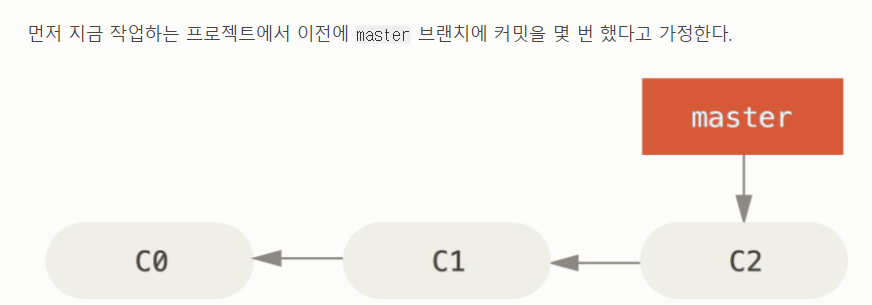
git branch <브랜치명>
git checkout <브랜치명>
=> git checkout -b <브랜치명>
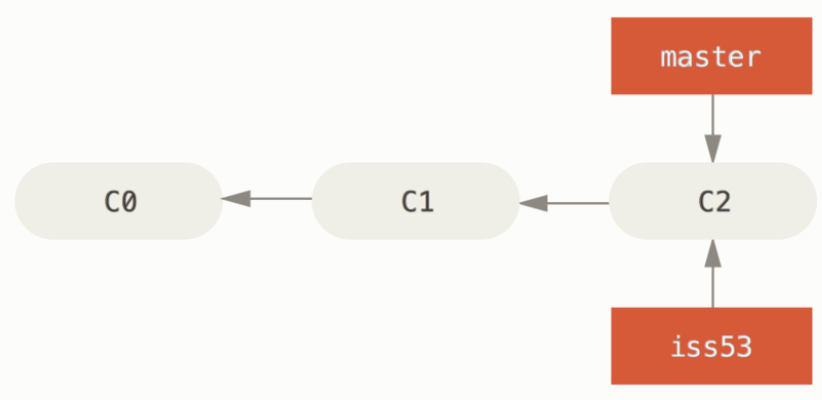
issu53 브랜치가 정상적으로 생성된다.
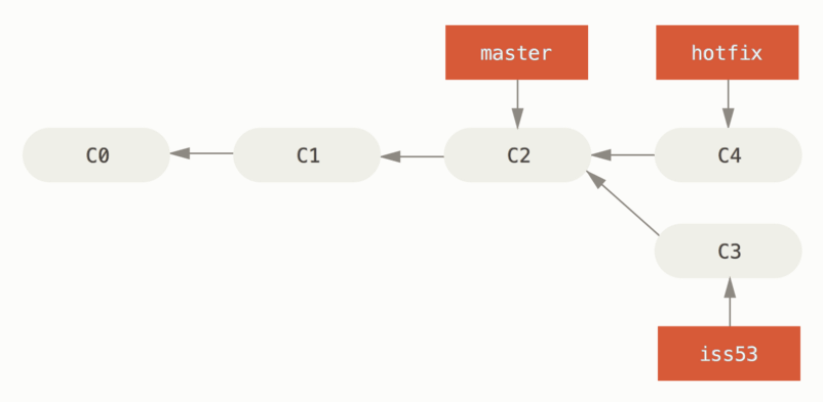
이 상태에서 master 브랜치에 hotfix브랜치를 머지를 하면 fast-forward 방식으로 동작한다.
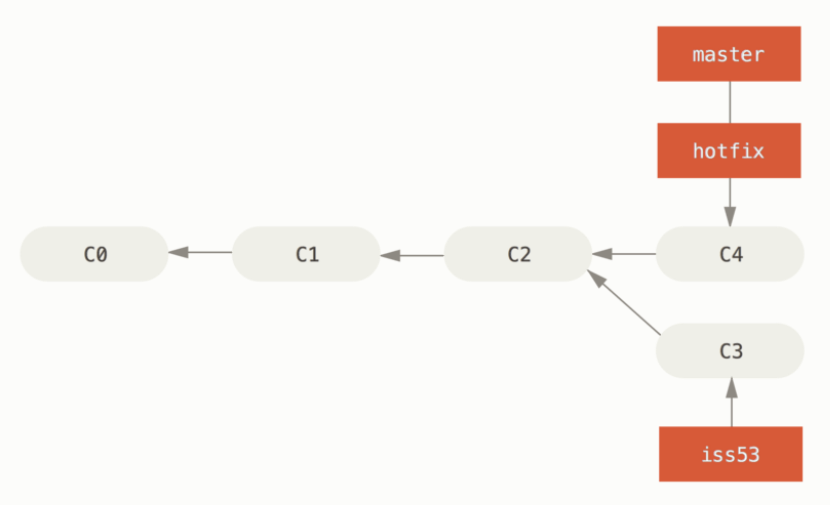
fast-forward 방식은 머지 될 때 커밋 내역이 발생하지 않는다.
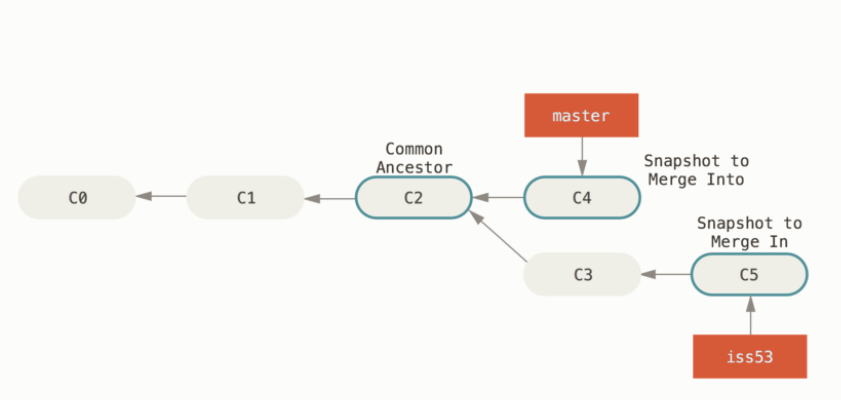
공통의 커밋과 커밋 2개를 머지하는 방식을 3-way 머지 방식이라고 한다.
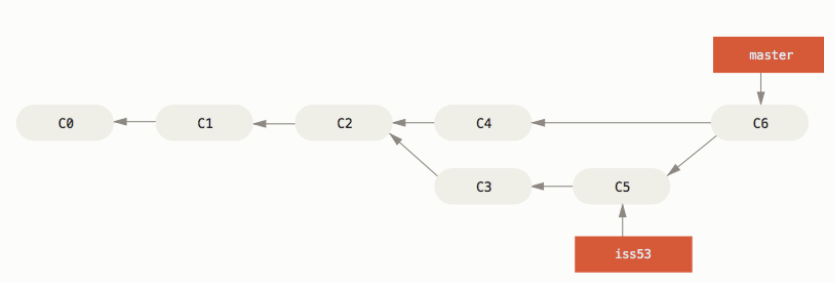
3-way 머지 방식은 머지할 때 커밋이력이 남는다.
git stash
git stash를 사용하는 경우 : 브랜치를 파서 개발 중에 다른 브랜치로 체크아웃을 해야 하는 상황인데 커밋을 하기 애매할 때 임시로 저장하는 역할
git stash 유의 사항 : git stash는 해당 파일이 한번이라도 git이 관리를 했어야 사용 가능하다. 예를 들어 f1.txt를 add를 한 후에 사용가능하다. 하지만 f2.txt를 만들고 add를 한번도 하지 않으면 git에서 관리를 하는 파일이 아니기 때문에 stash 명령어를 사용해도 stash의 기능을 사용할 수 없다.
MINGW64 ~/Documents/gitfth/chapter3/stash-ex (exp)
$ git stash
warning: LF will be replaced by CRLF in f1.txt.
The file will have its original line endings in your working directory
Saved working directory and index state WIP on exp: 9632431 1

MINGW64 ~/Documents/gitfth/chapter3/stash-ex (exp)
$ git status
On branch exp
nothing to commit, working tree clean
git stash를 사용하면 임시로 저장을 해주어서 working directory, staging area는 비어지게 된다.
MINGW64 ~/Documents/gitfth/chapter3/stash-ex (exp)
$ git stash apply
On branch exp
Changes not staged for commit:
  (use "git add <file>..." to update what will be committed)
  (use "git restore <file>..." to discard changes in working directory)
        modified:   f1.txt

no changes added to commit (use "git add" and/or "git commit -a")
git stash apply는 git stash를 한 가장 최근 버전을 불러온다.
MINGW64 ~/Documents/gitfth/chapter3/stash-ex (exp)
$ git stash list
stash@{0}: WIP on exp: 9632431 1
stash@{1}: WIP on exp: 9632431 1

MINGW64 ~/Documents/gitfth/chapter3/stash-ex (exp)
$ git stash drop
Dropped refs/stash@{0} (4085246d1b865d4566fdccc1ad6aee684e5462ef)

MINGW64 ~/Documents/gitfth/chapter3/stash-ex (exp)
$ git stash list
stash@{0}: WIP on exp: 9632431 1
git stash drop: stash한 최근 이력을 지우는 명령어다.
MINGW64 ~/Documents/gitfth/chapter3/stash-ex (exp)
$ git stash apply; git stash drop;
On branch exp
Changes to be committed:
  (use "git restore --staged <file>..." to unstage)
        new file:   f2.txt

Changes not staged for commit:
  (use "git add <file>..." to update what will be committed)
  (use "git restore <file>..." to discard changes in working directory)
        modified:   f1.txt

Dropped refs/stash@{0} (99673ec848f8b479c46679493a93bac5b3138df1)

MINGW64 ~/Documents/gitfth/chapter3/stash-ex (exp)
$ git stash list
git stash apply; git stash drop;
stash한 최근것을 불러오고 stash 최근 목록을 지워준다. => git stash pop과 같다.
MINGW64 ~/Documents/gitfth/chapter3/stash-ex (exp)
$ git stash list
stash@{0}: WIP on exp: 9632431 1

MINGW64 ~/Documents/gitfth/chapter3/stash-ex (exp)
$ git stash pop
On branch exp
Changes not staged for commit:
  (use "git add <file>..." to update what will be committed)
  (use "git restore <file>..." to discard changes in working directory)
        modified:   f1.txt

no changes added to commit (use "git add" and/or "git commit -a")
Dropped refs/stash@{0} (75024b1b37a224eaf2ded1a91c3f728ae4466c4d)
git 충돌 해결
브랜치끼리 병합할 경우 충돌이 발생할 수 있습니다.
a브랜치 b브랜치끼리 변화된 파일이 다를 경우 머지를 할 경우 정상적으로 병합이 됩니다.
또한 a브랜치 b브랜치가 같은 파일을 변화시켰어도 다른 위치를 변화시켰으면 충돌이 발생하지 않습니다.
하지만 a브랜치 b브랜치가 같은 파일의 비슷한 부분을 수정할 경우 충돌이 발생하고 유저가 직접 충돌을 해결하도록 위임합니다.
충돌 발생시 head는 현재 브랜치를 의미합니다. ===========를 기준으로 충돌이 된 위치를 알려주기 때문에 유저가 올바르게 수정하면 해결됩니다.
MINGW64 ~/Documents/gitfth/chapter4/1 (main)
$ git log
commit aeb83863fcd3fdbf99e0ea01e5f83748d01cd220 (HEAD -> main)
Author:
Date:   Sun Jun 16 19:31:33 2024 +0900

    4

commit fbc5b9ca57d266d7aba8136ff551a296c4f2664b
Author:
Date:   Sun Jun 16 19:31:19 2024 +0900

    3

commit 12545c689d68ab1bb58ea67a754b8a500881718c
Author:
Date:   Sun Jun 16 19:30:49 2024 +0900

    2

commit e2980a43f6c3cd8eec2058c827e8ff7340a7c738
Author:
Date:   Sun Jun 16 19:30:20 2024 +0900

    1

MINGW64 ~/Documents/gitfth/chapter4/1 (main)
$ git reset --hard fbc5b9ca57d266d7aba8136ff551a296c4f2664b
HEAD is now at fbc5b9c 3

MINGW64 ~/Documents/gitfth/chapter4/1 (main)
$ git log
commit fbc5b9ca57d266d7aba8136ff551a296c4f2664b (HEAD -> main)
Author:
Date:   Sun Jun 16 19:31:19 2024 +0900

    3

commit 12545c689d68ab1bb58ea67a754b8a500881718c
Author:
Date:   Sun Jun 16 19:30:49 2024 +0900

    2

commit e2980a43f6c3cd8eec2058c827e8ff7340a7c738
Author:
Date:   Sun Jun 16 19:30:20 2024 +0900

    1
git reset --<옵션> <커밋 id>를 하면 해당 커밋 전 내역이 사라진다.
MINGW64 ~/Documents/gitfth/chapter4/1 (main)
$ git reset --hard ORIG\_HEAD
HEAD is now at aeb8386 4

MINGW64 ~/Documents/gitfth/chapter4/1 (main)
$ git log
commit aeb83863fcd3fdbf99e0ea01e5f83748d01cd220 (HEAD -> main)
Author:
Date:   Sun Jun 16 19:31:33 2024 +0900

    4

commit fbc5b9ca57d266d7aba8136ff551a296c4f2664b
Author:
Date:   Sun Jun 16 19:31:19 2024 +0900

    3

commit 12545c689d68ab1bb58ea67a754b8a500881718c
Author:
Date:   Sun Jun 16 19:30:49 2024 +0900

    2

commit e2980a43f6c3cd8eec2058c827e8ff7340a7c738
Author:
Date:   Sun Jun 16 19:30:20 2024 +0900

    1
git reset --<옵션> ORIG_HEAD : reset 명령어 실행 전 git이 현재 브랜치의 HEAD가 가르키던 커밋을 저장해놓는다. 이를통해 reset을 취소할 수 있다.
MINGW64 ~/Documents/gitfth/chapter4/1 (main)
$ git reflog
aeb8386 (HEAD -> main) HEAD@{0}: reset: moving to ORIG_HEAD
fbc5b9c HEAD@{1}: reset: moving to fbc5b9ca57d266d7aba8136ff551a296c4f2664b
aeb8386 (HEAD -> main) HEAD@{2}: commit: 4
fbc5b9c HEAD@{3}: commit: 3
12545c6 HEAD@{4}: commit: 2
e2980a4 HEAD@{5}: commit (initial): 1
git reflog : 커밋이 어떻게 수정되었는지 log 기록이 저장되어 있다.
reset의 옵션
hard : working directory까지 reset, 즉 해당 커밋이력 이외의 내역은 사라진다.
mixed(기본값) : staging area까지 reset, 해당 커밋이력를 제외하고 working directory에 내역이 남는다.
soft : repository까지 reset 해당 커밋이력을 제외하고 staging area에 내역이 남는다.
'git, 리눅스' 카테고리의 다른 글
| 지옥에서 온 깃 chapter6 (0) | 2024.06.27 |
|---|---|
| Disconnected from 20.200.245.247 port 22 fatal: Could not read from remote repository. (0) | 2023.07.28 |
| sourcetree 실행이 안되는 오류 (0) | 2023.07.08 |
| 깃허브 private 레포지토리 clone이 안되는 경우 해결 방법 (0) | 2023.06.29 |
| git blog 만들기 (0) | 2023.05.12 |